REACH TRUCK SIMULATOR
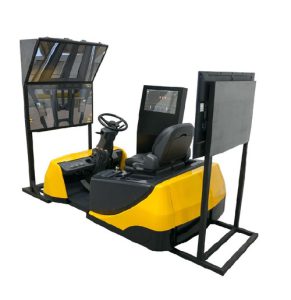
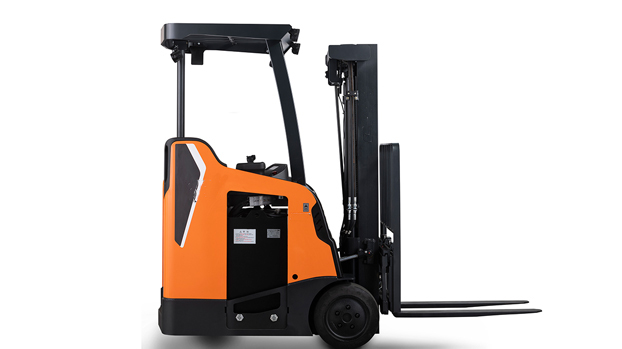
The reach truck simulator is a realistic and cost-effective learning tool developed to train qualified reach truck operators. By combining real reach truck equipment with rich scenario content, it ensures operators receive comprehensive training.
Reach Truck Simulator Training for Safe and Effective Use
SANLAB Learning's reach truck simulator provides a safe, realistic place for operators to practice key skills. This simulator focuses on key areas such as mast operation, load stacking, and navigating narrow aisles. With detailed scenarios and VR integration, operators can train safely. They avoid the risks of real-world operations. The simulator has versions to meet different training needs. They include: stationary, 3DOF and 6DOF. They offer a highly immersive experience.
Scenerios
Slalom
Warehouse Stacking
Obstacle Navigation
Load Balancing
Pallet Moving
High Shelf Loading
Advanced Features for Reach Truck Simulator Training
Enhanced 3D Visuals:
Reach truck simulator uses advanced 3D graphics to create lifelike environments. Operators face real-world conditions, like different weather and times of day. This enhances the training's realism.
Full-Scale Cabin Option:
The simulator has a fully equipped cabin. It replicates a real reach truck's controls, like the steering wheel, pedals, and levers. This ensures a realistic training experience.
Accurate Physical Calculations:
SANLAB Learning’s simulator models engine RPM, torque, and hydraulic pressure. It gives operators detailed feedback on vehicle performance.
Reach Truck Controls with Real Equipment:
Simulator replicates real reach truck parts. It lets operators learn the controls before using real machines.
VR Integration for Immersive Experience:
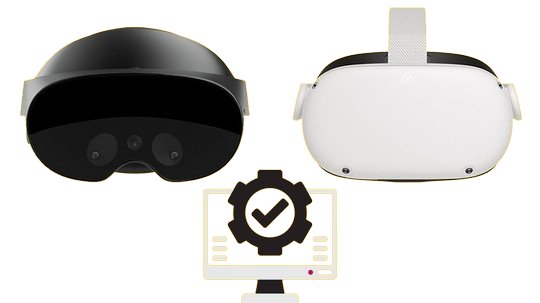
The simulator supports Oculus Rift and HTC Vive headsets. It provides a 360-degree view of the environment. This enhances spatial awareness for an immersive training experience.
Various Motion Platform Options for Reach Truck Simulator VR Training
The reach truck simulator offers stationary, 3DOF and 6DOF motion platform options, each providing different levels of realism and control to meet diverse training needs.
Motion Platform Options of Reach Truck Simulator VR:
• Stable Simulators — Ideal for learning basic controls without motion feedback.
• 3DOF (Pitch, Heave, Roll) — Offers essential movement feedback for beginners.
• 6DOF (Pitch, Heave, Roll, Yaw, Surge, Sway) — Provides a highly realistic experience with full-motion simulation.
Motion Platform Response Strength Adjustment:
This interface lets you adjust the motion platform’s response strength in the VR reach truck simulator.
• Low — Softer, reduced feedback.
• Mid — Balanced realism and response strength.
• High — Strong, real-world-like feedback.
These settings help tailor the simulator’s feedback to real operating conditions, ensuring effective and realistic training.
Learn More
Download Product Catalogue
Training Scenarios for Reach Truck Simulator
Reach truck simulator includes a range of scenarios to develop essential operator skills in various environments:
Course Highlights:
• Slalom — Enhances maneuverability as operators navigate through narrow aisles, improving control.
• Warehouse Stacking — Focuses on precise load stacking at high elevations, boosting efficiency and safety.
• Obstacle Navigation — Trains operators to handle complex obstacles, improving situational awareness.
•
Load Balancing — Teaches operators how to handle loads efficiently, reducing the risk of tip-overs.
• Pallet Moving — Focuses on transporting pallets safely through confined spaces.
• Tight Turn Handling — Helps operators improve precision when navigating tight corners and narrow paths.
• High Shelf Loading — Trains operators to safely lift and position loads on high shelves.
Enhanced Training with VR Integration
The VR integration of the reach truck simulator boosts training. It creates an engaging learning environment. Instructors can watch operators' performance in real time. They can then give immediate feedback on strengths and areas for improvement.
Camera Angles for Reach Truck Simulator Training
Camera angles let operators view the machine and its surroundings. This ensures safe and efficient use. Our simulator offers a range of camera angles to provide comprehensive training. The realistic camera views in the reach truck sim VR include:
• Operator Perspective Camera
• External Camera
• Load Camera
• Overhead View Camera
• Rear View Camera
• Trainer Cameras
Employing these six camera angles makes training more engaging and realistic. This approach helps both operators and trainers. It lets operators master machine control from different viewpoints. This setup is particularly useful for enhancing skills with heavy machinery.
Reach Truck Simulator Performance & Reporting
Real-Time Monitoring: Instructors can see operators' actions in real time. They can track key metrics like speed, load control, and maneuverability. This enables immediate feedback to improve operator performance.
Detailed Reporting: The simulator provides comprehensive reports including:
• Date of Scenario: Records when the scenario was conducted.
• Scenario Creator: Indicates who designed the training scenario.
• Average Score: Summarizes the operator’s performance.
• Task Completion Metrics: Evaluates accuracy and efficiency in task execution.
• Time Usage: Tracks the time taken to complete tasks.
• Error-Free Operation: Assesses performance without mistakes.
• Metrics Explanation: Provides detailed descriptions of how each metric is calculated.
These features ensure effective training by delivering a thorough analysis of operator performance.
Weather Simulation in Reach Truck Training
SANLAB Learning's reach truck simulator uses real-world weather for training. It offers an immersive, realistic experience.
With advanced graphics, operators can navigate various scenarios that simulate different weather patterns, times of day, and seasons.
The simulation allows operators to work in different environments such as sunrise, midday, sunset, and night. You can adjust weather conditions, like rain, snow, and fog. You can also customize their intensity levels.
Real-time weather simulation equips operators to handle challenges they may face in actual work settings.
Control Panel Overview for Reach Truck Simulator
The control panel of the simulator provides vital info and controls. It shows the temperature, joystick functions, and the throttle and brake pedals. Key features include:
• Touchscreen Display: Shows real-time data on vehicle status, speed, and engine performance.
• Joystick Controls: Allows precise control of the reach truck's movement and load-handling operations.
• System Monitoring Indicators: Displays engine RPM, hydraulic pressure, and torque, offering real-time feedback.
• Throttle and Brake Pedals: Manages the gas and brake functions for smooth operation.
• Auxiliary Buttons: Controls lights, horn, wipers, and emergency stop, ensuring the operator can manage various operational conditions.
• Critical Controls: Operates essential functions, including the start switch, main switch, and torque power adjustment.
This control panel provides operators with the key information and options required for efficient and accurate operation of the reach truck simulator.
SimPro Reach Truck Simulator Series
SimPro6
Reach Truck Simulator
SimPro3
Reach Truck Simulator
SimPro
Reach Truck Simulator
Virtual Reality Integration
Using VR in the reach truck simulator boosts training. It creates a realistic, engaging environment. VR technology allows operators to encounter real-world scenarios within a safe training space. They can practice in confined spaces, handle bad weather, and adapt to different surfaces. The 360-degree visuals and advanced graphics replicate the machine's interior and exterior. They help users better understand the controls. Additionally, VR provides real-time feedback, enabling operators to quickly identify and correct mistakes. It speeds up learning and boosts adaptability. Operators become more flexible in varied job conditions.
Equipment Requirements of Reach Truck Simulator
• 1 simulation computer
• 1 virtual reality headset (for the virtual reality version)
• 3 monitors/TVs
• 1 cabin containing the physical inputs of the reach truck machine (steering wheel, pedals, etc.)
• 1 touch screen
• 1 uninterruptible power supply (used to ensure data and system security against power outages)
Quantification and Consideration
Name of the institution providing education
Name of the person providing education
Measurement and quality control
Data from the completed course
Student name
Date the course was given
Total duration of the course
Reports of completed lessons